This is the last of the posts I will do for now on Oracle quick refereces.
I decided to write this 4 blog articles to save me time using Google in the future. So this last one is a bit peculiar, there are just a bunch of SQL commands that can be very useful for exploring a new database you don't know much about.
-- Finds all the columns in those tables that contain the string ESS
-- in the table name and orders them alphabetically
SELECT table_name, column_name
FROM ALL_TAB_COLS
WHERE table_name LIKE '%ESS%'
AND owner != 'MY_SCHEMA'
ORDER BY table_name;
-- Same as the previous one but includes more data and excludes the owner SYS
SELECT *
FROM ALL_TAB_COLS
WHERE table_name LIKE '%ESS%'
AND owner != 'SYS';
-- All the constraints for the tables in all schemas in the database
SELECT *
FROM all_constraints;
-- All the constraints for the tables in all an specific schema
SELECT *
FROM all_constraints
WHERE UPPER(r_owner) LIKE 'MY_SCHEMA';
-- All the foreign key constraints for the tables in all an specific schema
SELECT *
FROM all_constraints
WHERE UPPER(r_owner) LIKE 'MY_SCHEMA'
AND UPPER(constraint_type) LIKE 'R';
-- This finds the primary key of a table
SELECT UPPER(constraint_name)
FROM all_constraints
WHERE constraint_type IN ('P', 'U')
AND UPPER(table_name) LIKE UPPER(:r_table_name)
AND UPPER(owner) LIKE 'MY_SCHEMA';
-- Using the previous command as input to the following, allows us to find all of the
-- children of a particular table(Have as FK the PK of their parent)
SELECT table_name, constraint_name, status, owner
FROM all_constraints
WHERE UPPER(r_owner) LIKE 'MY_SCHEMA'
AND UPPER(constraint_type) LIKE 'R'
AND UPPER(r_constraint_name) IN
(
SELECT UPPER(constraint_name)
FROM all_constraints
WHERE constraint_type IN ('P', 'U')
AND UPPER(table_name) LIKE UPPER(:r_table_name)
AND UPPER(owner) LIKE 'MY_SCHEMA'
)
ORDER BY table_name, constraint_name;
--Find the parents of a table
SELECT *
FROM all_constraints
WHERE constraint_type IN ('P', 'U')
AND UPPER(owner) LIKE 'MY_SCHEMA'
AND UPPER(constraint_name) in
(
SELECT UPPER(r_constraint_name)
FROM all_constraints
WHERE UPPER(table_name) LIKE UPPER(:r_table_name)
AND UPPER(constraint_type) LIKE 'R'
);
--Finding tables that contain a word in their name
SELECT table_name, owner
FROM all_tables
WHERE UPPER(table_name) LIKE '%something%';

"Javing" is the present continuous form of "to program in Java". Here you will find: code snippets, examples, tips, tricks, tutorials, best practices, miscellaneous and much more. Enjoy your Javing!
Thursday, December 10, 2015

Subquery basics - Oracle SQL quick ref 3
A sub-query is a query that is nested inside a SELECT, INSERT, UPDATE, or DELETE statement, or inside another sub-query. A sub-query is also called an inner query or inner select, while the statement containing a sub-query is also called an outer query or outer select.
Depending on the amount of results a sub-query returns, we distinguish 2 types of sub-queries:
In the following single sub-query example, the AVG function returns just one result which is used by the outer query.
SELECT employee_id, last_name, salary
FROM employees
WHERE salary > (SELECT AVG(salary) FROM employees)
ORDER BY salary;
In the next example a multiple row sub-query is used to return some departments which the outer query will use in its IN clause.
SELECT last_name, department_id, job_id
FROM employees
WHERE department_id IN (SELECT department_id
FROM departments
WHERE location_id=2897);
It is important that both single row and multiple row sub-queries are correctly used in a context that either expects a single result or a multiple result respectively.
Its important to mention that the Oracle server will always execute sub-queries first.
Sub-queries can be used in the WHERE clause, but also in the HAVING clause.
This example returns job with the lowest average salary.
SELECT job_id, AVG(salary)
FROM employees
GROUP BY job_id
HAVING AVG(salary) = (SELECT MIN(AVG(salary))
FROM employees
GROUP BY job_id);
The difference between HAVING and WHERE, is that WHERE does not work with aggregated functions, such as AVG, COUNT...
Depending on the amount of results a sub-query returns, we distinguish 2 types of sub-queries:
- Single row sub-queries: Queries that return only one row from the inner SELECT statement
- Multiple row sub-queries: Queries that return multiple rows from the inner SELECT statement
In the following single sub-query example, the AVG function returns just one result which is used by the outer query.
SELECT employee_id, last_name, salary
FROM employees
WHERE salary > (SELECT AVG(salary) FROM employees)
ORDER BY salary;
In the next example a multiple row sub-query is used to return some departments which the outer query will use in its IN clause.
SELECT last_name, department_id, job_id
FROM employees
WHERE department_id IN (SELECT department_id
FROM departments
WHERE location_id=2897);
It is important that both single row and multiple row sub-queries are correctly used in a context that either expects a single result or a multiple result respectively.
Its important to mention that the Oracle server will always execute sub-queries first.
Sub-queries can be used in the WHERE clause, but also in the HAVING clause.
This example returns job with the lowest average salary.
SELECT job_id, AVG(salary)
FROM employees
GROUP BY job_id
HAVING AVG(salary) = (SELECT MIN(AVG(salary))
FROM employees
GROUP BY job_id);
The difference between HAVING and WHERE, is that WHERE does not work with aggregated functions, such as AVG, COUNT...
Using Joins - Oracle SQL quick ref 2
NATURAL JOIN is a type of join that relies on both tables involved on the join to have a common column name. For example if an employee table has a foreign key called department_id and the departments table has a primary key called department_id, then it is possible to do a natural join because in both sides there is a column with the same name.
SELECT employee_id, last_name, department_id, department_name
FROM employees NATURAL JOIN departments;
Here another example, where both the locations and departments table, have location_id:
SELECT department_id, department_name, location_id, city
FROM departments NATURAL JOIN locations
WHERE department_id IN (20, 50);
There is a type of join, that uses the USING keyword. This Join, requires that the column that is used for the join is explicitly mentioned in the USING clause.
SELECT employee_id, last_name, location_id, department_id
FROM employees JOIN departments
USING (department_id);
When we use the USING keyword, we are allowed to use aliases if we want but the only limitation is that the WHERE clause cannot use aliases. For example, WHERE d.location_id... would not be valid.
SELECT l.city, d.department_name
FROM locations l JOIN departments d
USING (location_id)
WHERE location_id = 1400;
SELECT first_name, d.department_name, d.manager_id
FROM employees e JOIN departments d
USING (department_id)
WHERE department_id = 50;
The ON keyword is the most commonly used way of doing joins in this type of does not mandate that the columns in both sides have the same name, also there are no limitations in the usage of aliases in the WHERE clause.
SELECT e.employee_id, e.last_name, e.department_id, d.department_id, d.location_id
FROM employees e
JOIN departments d ON (e.department_id = d.department_id);
The JOIN clause has an AND part, which is equivalent to the WHERE clause, so WHERE is not needed but can also be used along side.
SELECT e.employee_id, e.last_name, e.department_id, d.department_id, d.location_id
FROM employees e
JOIN departments d ON (e.department_id = d.department_id)
AND e.manager_id=149;
SELECT e.employee_id, e.last_name, e.department_id, d.department_id, d.location_id
FROM employees e
JOIN departments d ON (e.department_id = d.department_id)
WHERE e.manager_id=149;
It is possible to have as many JOIN clauses as desired in a query.
SELECT e.last_name, e.job_id, e.department_id, d_depatment_name
FROM employees e
JOIN departments d ON (e.department_id = d.department_id)
JOIN locations l ON (d.location_id = l.location_id)
WHERE l.city = 'London';
Sometimes its necessary to perform self joins. In this example a non normalized table of employees, has a row to represent that the worker is a manager. So if we wanted to see who is the manager of who, we would have to do something like this.
SELECT worker.last_name emp, manager.last_name mgr
FROM employees worker
JOIN employees manager ON (worker.manager_id = manager.employee_id);
Also in SQL, there are other types of joins called OUTER and INNER that are useful when we want to widen or narrow the result set. INNER JOIN will only return rows, if both tables in the join have associated data in the other side of the join. OUTER JOIN is not that strict, they will still return rows even if they have no associated data in the other side of the join. While there is one type of INNER JOIN, the OUTER JOIN cam come in 3 flavours(LEFT,RIGHT, FULL).
The LEFT OUTER JOIN will include all employees and their department name even if they don't have an associated department.
SELECT e.last_name, e.department_id, d.department_name
FROM employees e LEFT OUTER JOIN departments d
ON (e.department_id = d.department_id);
The RIGHT OUTER JOIN will include all the departments that are associated with employees, but also all the departments that are not associated with employees at all.
SELECT e.last_name, e.department_id, d.department_name
FROM employees e RIGHT OUTER JOIN departments d
ON (e.department_id = d.department_id);
The FULL OUTER JOIN will return all the departments even if they are not associated with employees and also all the employees even if they are not associated with departments.
SELECT e.last_name, e.department_id, d.department_name
FROM employees e FULL OUTER JOIN departments d
ON (e.department_id = d.department_id);
The INNER JOIN will return all results that have employees with departments and all departments with employees.
SELECT e.last_name, e.department_id, d.department_name
FROM employees e INNER JOIN departments d
ON (e.department_id = d.department_id);

SELECT employee_id, last_name, department_id, department_name
FROM employees NATURAL JOIN departments;
Here another example, where both the locations and departments table, have location_id:
SELECT department_id, department_name, location_id, city
FROM departments NATURAL JOIN locations
WHERE department_id IN (20, 50);
There is a type of join, that uses the USING keyword. This Join, requires that the column that is used for the join is explicitly mentioned in the USING clause.
SELECT employee_id, last_name, location_id, department_id
FROM employees JOIN departments
USING (department_id);
When we use the USING keyword, we are allowed to use aliases if we want but the only limitation is that the WHERE clause cannot use aliases. For example, WHERE d.location_id... would not be valid.
SELECT l.city, d.department_name
FROM locations l JOIN departments d
USING (location_id)
WHERE location_id = 1400;
SELECT first_name, d.department_name, d.manager_id
FROM employees e JOIN departments d
USING (department_id)
WHERE department_id = 50;
The ON keyword is the most commonly used way of doing joins in this type of does not mandate that the columns in both sides have the same name, also there are no limitations in the usage of aliases in the WHERE clause.
SELECT e.employee_id, e.last_name, e.department_id, d.department_id, d.location_id
FROM employees e
JOIN departments d ON (e.department_id = d.department_id);
The JOIN clause has an AND part, which is equivalent to the WHERE clause, so WHERE is not needed but can also be used along side.
SELECT e.employee_id, e.last_name, e.department_id, d.department_id, d.location_id
FROM employees e
JOIN departments d ON (e.department_id = d.department_id)
AND e.manager_id=149;
SELECT e.employee_id, e.last_name, e.department_id, d.department_id, d.location_id
FROM employees e
JOIN departments d ON (e.department_id = d.department_id)
WHERE e.manager_id=149;
It is possible to have as many JOIN clauses as desired in a query.
SELECT e.last_name, e.job_id, e.department_id, d_depatment_name
FROM employees e
JOIN departments d ON (e.department_id = d.department_id)
JOIN locations l ON (d.location_id = l.location_id)
WHERE l.city = 'London';
Sometimes its necessary to perform self joins. In this example a non normalized table of employees, has a row to represent that the worker is a manager. So if we wanted to see who is the manager of who, we would have to do something like this.
SELECT worker.last_name emp, manager.last_name mgr
FROM employees worker
JOIN employees manager ON (worker.manager_id = manager.employee_id);
Also in SQL, there are other types of joins called OUTER and INNER that are useful when we want to widen or narrow the result set. INNER JOIN will only return rows, if both tables in the join have associated data in the other side of the join. OUTER JOIN is not that strict, they will still return rows even if they have no associated data in the other side of the join. While there is one type of INNER JOIN, the OUTER JOIN cam come in 3 flavours(LEFT,RIGHT, FULL).
The LEFT OUTER JOIN will include all employees and their department name even if they don't have an associated department.
SELECT e.last_name, e.department_id, d.department_name
FROM employees e LEFT OUTER JOIN departments d
ON (e.department_id = d.department_id);
The RIGHT OUTER JOIN will include all the departments that are associated with employees, but also all the departments that are not associated with employees at all.
SELECT e.last_name, e.department_id, d.department_name
FROM employees e RIGHT OUTER JOIN departments d
ON (e.department_id = d.department_id);
The FULL OUTER JOIN will return all the departments even if they are not associated with employees and also all the employees even if they are not associated with departments.
SELECT e.last_name, e.department_id, d.department_name
FROM employees e FULL OUTER JOIN departments d
ON (e.department_id = d.department_id);
The INNER JOIN will return all results that have employees with departments and all departments with employees.
SELECT e.last_name, e.department_id, d.department_name
FROM employees e INNER JOIN departments d
ON (e.department_id = d.department_id);

Grouping data - Oracle SQL quick ref 1
Oracle SQL group functions operate on sets of rows to give one result per group of inputs(In other words, many inputs, one output): AVG,COUNT,MAX,MIN,SUM...
SELECT MAX(salary) max, MIN(salary) min, SUM(salary) sum, ROUND(AVG(salary),0) avg
FROM employees;
SELECT COUNT(*) numberOfEmployees
FROM employees;
Sometimes the rows of data, may contain duplications that we don't want to be taken into account.
Then the DISTINCT keyword, can be useful to suppress the duplicates.
SELECT COUNT(DISTINCT department_id)
FROM employees
By default group functions will ignore null values but if we want to not ignore then, we should use the NVL function.
SELECT NVL(AVG(commission_pct))
FROM employees;
It is possible in sql to select different groups/sub sets of data, from one same table, this is know as grouping. The GROUP BY keyword allows us to divide the rows of a table into groups and optionally latter apply a group function to act upon each of those groups.
For example, we could get the average salary for each department using the group by function:
SELECT department_id, AVG(salary)
FROM employees
GROUP BY department_id;
Important!: If a SELECT statement contains a GROUP BY clause, all non aggregate functions(department_id) that are defined in the SELECT, need to also be in the GROUP BY clause.
When working with GROUP BY and we want to add additional restrictions to the groups, we are not allowed to use the WHERE clause, instead we must use the HAVING clause.
For example lets say that we want to see the departments and their max salaries, but only if the max salary of the department is greater than 10000:
SELECT department_id, MAX(salary)
FROM employees
GROUP BY department_id
HAVING MAX(salary)>10000;
SELECT MAX(salary) max, MIN(salary) min, SUM(salary) sum, ROUND(AVG(salary),0) avg
FROM employees;
SELECT COUNT(*) numberOfEmployees
FROM employees;
Sometimes the rows of data, may contain duplications that we don't want to be taken into account.
Then the DISTINCT keyword, can be useful to suppress the duplicates.
SELECT COUNT(DISTINCT department_id)
FROM employees
By default group functions will ignore null values but if we want to not ignore then, we should use the NVL function.
SELECT NVL(AVG(commission_pct))
FROM employees;
It is possible in sql to select different groups/sub sets of data, from one same table, this is know as grouping. The GROUP BY keyword allows us to divide the rows of a table into groups and optionally latter apply a group function to act upon each of those groups.
For example, we could get the average salary for each department using the group by function:
SELECT department_id, AVG(salary)
FROM employees
GROUP BY department_id;
Important!: If a SELECT statement contains a GROUP BY clause, all non aggregate functions(department_id) that are defined in the SELECT, need to also be in the GROUP BY clause.
When working with GROUP BY and we want to add additional restrictions to the groups, we are not allowed to use the WHERE clause, instead we must use the HAVING clause.
For example lets say that we want to see the departments and their max salaries, but only if the max salary of the department is greater than 10000:
SELECT department_id, MAX(salary)
FROM employees
GROUP BY department_id
HAVING MAX(salary)>10000;
Saturday, November 14, 2015
Using VisualVm to find a thread leak
A leak is when a application does not release references to a thread object properly. Due to this some Threads do not get garbage collected and the number of unused threads grow with time. Thread leak can often cause serious issues on a Java application since over a period of time too many threads will be created but not released and may cause applications to respond slow or hang.
In this article I am going to show how to perform a routine inspection of an application to find a thread leak. The first thing we will need is some sort of tool that could help us monitor the virtual machine of the running application. There is a very widely used tool, called VisualVm. It comes with the JDK but also can be downloaded separately in any OS.
Java visual vm is a profiling tool that comes with the jdk and can be used to monitor your running applications. But in order to be able to connect to your app using visualVm, you will have to include a few parameters to your start script.

So if the app is configured and running, all you have to do is use visualVm to remotely connect to the correct host and port.


In this article I am going to show how to perform a routine inspection of an application to find a thread leak. The first thing we will need is some sort of tool that could help us monitor the virtual machine of the running application. There is a very widely used tool, called VisualVm. It comes with the JDK but also can be downloaded separately in any OS.
Java visual vm is a profiling tool that comes with the jdk and can be used to monitor your running applications. But in order to be able to connect to your app using visualVm, you will have to include a few parameters to your start script.

java
-Dcom.sun.management.jmxremote
-Dcom.sun.management.jmxremote.port=8333
-Dcom.sun.management.jmxremote.local.only=false
-Dcom.sun.management.jmxremote.authenticate=false
-Dcom.sun.management.jmxremote.ssl=false
-jar myApp.jar

Once you connect to your application via visualVm, you can browse the diferent tabs and look for relevant information related to the VM and the threads. It will be very useful to also install a plugin for visual vm, called thread inspector which will allow you to examine in depth the running threads. You will be able to find the plugin in Tools>Plugins>Search for Thread Inspector

When there is a thread leak, often we will see an unusual large amounts one same type of thread visualVm's threads tab. If we double click in any of those threads, the plugin will show us more details about the class creating that thread.

Go to your source codes and place a break point in the class constructor.

Now run your debugger in one of your acceptance tests and observe. The frames tab will highlight a bit brighter the methods in your source codes that are creating the thread.

Hopefully the debugger will help you pinpoint the cause of the issue so you can fix it.
In the given example, the cause of this leak was that a Jersey DI configured to create some instances of a pool per request and this was consuming the resources. The solution is either to make that injection Singleton or not do it at all if it is not needed(which hapen to be the case).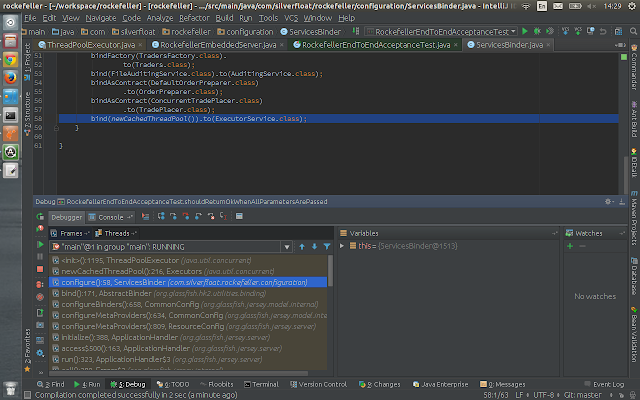
In the given example, the cause of this leak was that a Jersey DI configured to create some instances of a pool per request and this was consuming the resources. The solution is either to make that injection Singleton or not do it at all if it is not needed(which hapen to be the case).

Finally, you could run visualVm again in your local running app to verify that there is no leakage before release. Running the acceptance test is probably not enough because you want to see if the leakage is there, so best is to run the app in a local or test environment.
For further reading and more detailed usage instructions see:
https://visualvm.java.net/gettingstarted.htmlSunday, November 1, 2015
installing jenkins in ubuntu server 14.04
What better way of spending a beautiful Sunday than to trying to discover how to configure Jenkins in Ubuntu server 14.4 for 3 hours(Can you feel the sarcasm?...). Anyway this post is just to avoid similar frustrations in the future, this brief summary should do the job, just copy paste all the commands and you will have jenkins working in your server
Jenkins installation steps
Running Jenkins
After installing instalation is complete.
There will be a hidden directory under your /home/username called ./jenkins
This directory contains all the jobs and other configurations.
When we want to run jenkins we need to run as our username(should not run as root because it would be taking the configs from /var/lib/jenkins/jobs), from the directory:
/usr/share/jenkins/
using the command:
nohup java -jar jenkins.war --httpPort=5001 &
You can less nohup.out to see the log of the nohup command
Jenkins installation steps
 wget -q -O - https://jenkins-ci.org/debian/jenkins-ci.org.key | sudo apt-key add -
 sudo sh -c 'echo deb http://pkg.jenkins-ci.org/debian binary/ > /etc/apt/sources.list.d/jenkins.list'
 sudo apt-get update
 sudo apt-get install jenkins
Running Jenkins
After installing instalation is complete.
There will be a hidden directory under your /home/username called ./jenkins
This directory contains all the jobs and other configurations.
When we want to run jenkins we need to run as our username(should not run as root because it would be taking the configs from /var/lib/jenkins/jobs), from the directory:
/usr/share/jenkins/
using the command:
nohup java -jar jenkins.war --httpPort=5001 &
You can less nohup.out to see the log of the nohup command
Tuesday, September 29, 2015
Discovering transitive dependencies in maven
Sometimes we discover a dependency in the project that we didn't put there. The reason for this is often a transitive dependency(a dependency of our dependency).
Keeping an eye on transitive dependencies and tidying up the pom files time after time is a good practice.
A way of discovering transitive dependencies is to use the command "mvn dependency:analyse".
This command comes from a set of tools inside the maven-dependency-plugin.
In order to use it, you have to include the dependency plugin in your project like this:
This plugin can do multiple things, the analyze command is very useful for finding more information about dependencies.
Unused declared dependencies found: The dependencies are not used in the project
Used undeclared dependencies found: Transitive dependencies used in the project(not declared in the pom)
The output of the command will be presented as warning in the terminal, if you want to be very strict about keeping your your pom tidy,
you could add the analyze command in the build lifecycle and configure maven to fail the build if any warnings are found(Maybe I explain that in another
post sometime ;) ).
Another great tool that comes in the dependency plugin and that its worth mentioning, is
"mvn dependency:tree".
It will help you visualise the dependencies tree of your pom and understand it better.
Just some more interesting stuff about maven if you want to read more:
http://blog.florian-hopf.de/2014/01/analyze-your-maven-project-dependencies.html
http://www.kyleblaney.com/maven-best-practices/
https://maven.apache.org/plugins/maven-dependency-plugin/
Keeping an eye on transitive dependencies and tidying up the pom files time after time is a good practice.
A way of discovering transitive dependencies is to use the command "mvn dependency:analyse".
This command comes from a set of tools inside the maven-dependency-plugin.
In order to use it, you have to include the dependency plugin in your project like this:
 <!- If you are just using it in a single module project->
     <plugins>
       <plugin>
         <groupId>org.apache.maven.plugins</groupId>
         <artifactId>maven-dependency-plugin</artifactId>
         <version>2.10</version>
       </plugin>
     </plugins>
  <!-- If you are using a multi module project then use this in the parent POM -->
   <pluginManagement>
    <plugins>
     <plugin>
      <groupId>org.apache.maven.plugins</groupId>
      <artifactId>maven-dependency-plugin</artifactId>
      <version>2.10</version>
     </plugin>
    </plugins>
   </pluginManagement>
This plugin can do multiple things, the analyze command is very useful for finding more information about dependencies.
Unused declared dependencies found: The dependencies are not used in the project
Used undeclared dependencies found: Transitive dependencies used in the project(not declared in the pom)
The output of the command will be presented as warning in the terminal, if you want to be very strict about keeping your your pom tidy,
you could add the analyze command in the build lifecycle and configure maven to fail the build if any warnings are found(Maybe I explain that in another
post sometime ;) ).
Another great tool that comes in the dependency plugin and that its worth mentioning, is
"mvn dependency:tree".
It will help you visualise the dependencies tree of your pom and understand it better.
Just some more interesting stuff about maven if you want to read more:
http://blog.florian-hopf.de/2014/01/analyze-your-maven-project-dependencies.html
http://www.kyleblaney.com/maven-best-practices/
https://maven.apache.org/plugins/maven-dependency-plugin/
Subscribe to:
Posts (Atom)